
Implementing HUMAN Skills Studio Framework Phase 0
Build the Minimum Viable System

In part 1 of this series, I shared my thoughts and work on developing an outline for a practical framework to guide teachers in how to guide college students in using generative AI technology (like ChatGPT) in ways that enable them to deeply develop their human skills (what most folks call “soft skills”). Click here to read that post
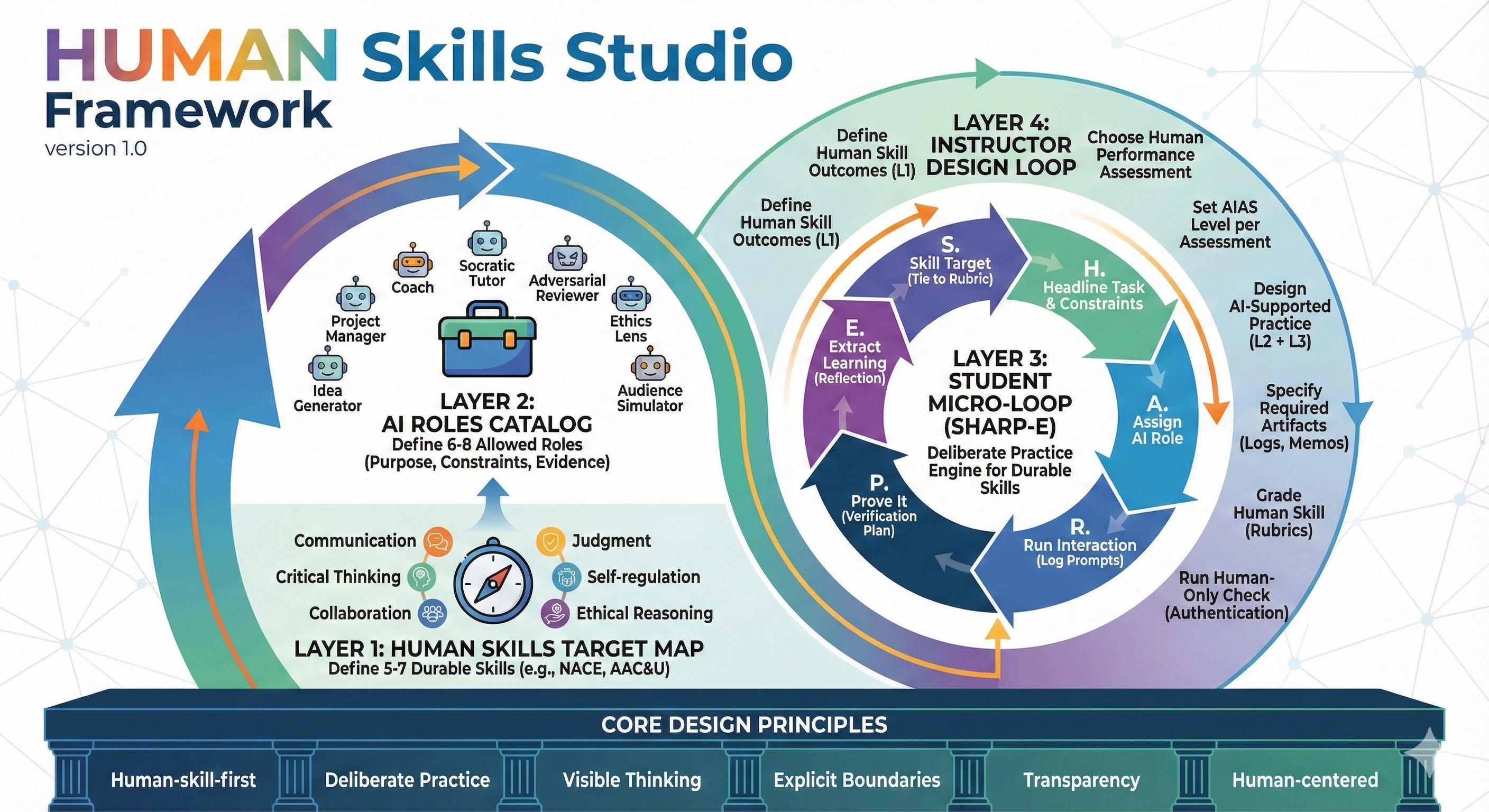
In this and the following four posts, I’ll outline a phased implementation plan for the HUMAN Skills Studio Framework.
Phase 0: Build the Minimum Viable System (Weeks 1–4)
Goal
Create the smallest version of the HUMAN Skills Studio you can run in one class session and one assignment.
The purpose of Phase 0 is existence.
You need working infrastructure before you can iterate.
Everything you build here should be simple enough to explain in five minutes and robust enough to survive contact with real students.
Week 1: Define Your Human Skills Map
What to do
Select 5–7 human skills you want students to work on this semester.
Define each as an observable behavior, something you could see a student do (or fail to do) in real time.
Why observable behaviors matter
The research on skill development is clear: vague goals produce vague results.
When you define a skill as “critical thinking,” students don’t know what to practice.
When you define it as “identifies unstated assumptions in an argument and articulates why they matter,” students have a target.
Observable behaviors also solve the AI verification problem.
You can’t see whether a student “thought critically” about an AI output.
You can see whether they identified a factual error, questioned a source, or pushed back on a recommendation.
How to do it
Step 1: Brainstorm skills (15 minutes)
List the human capabilities your course should develop. Draw from three sources:
What does a professional in this field do that AI cannot yet do well?
What do students struggle with that this course should address?
What do you personally value seeing in student work?
Step 2: Convert to observable behaviors (30 minutes)
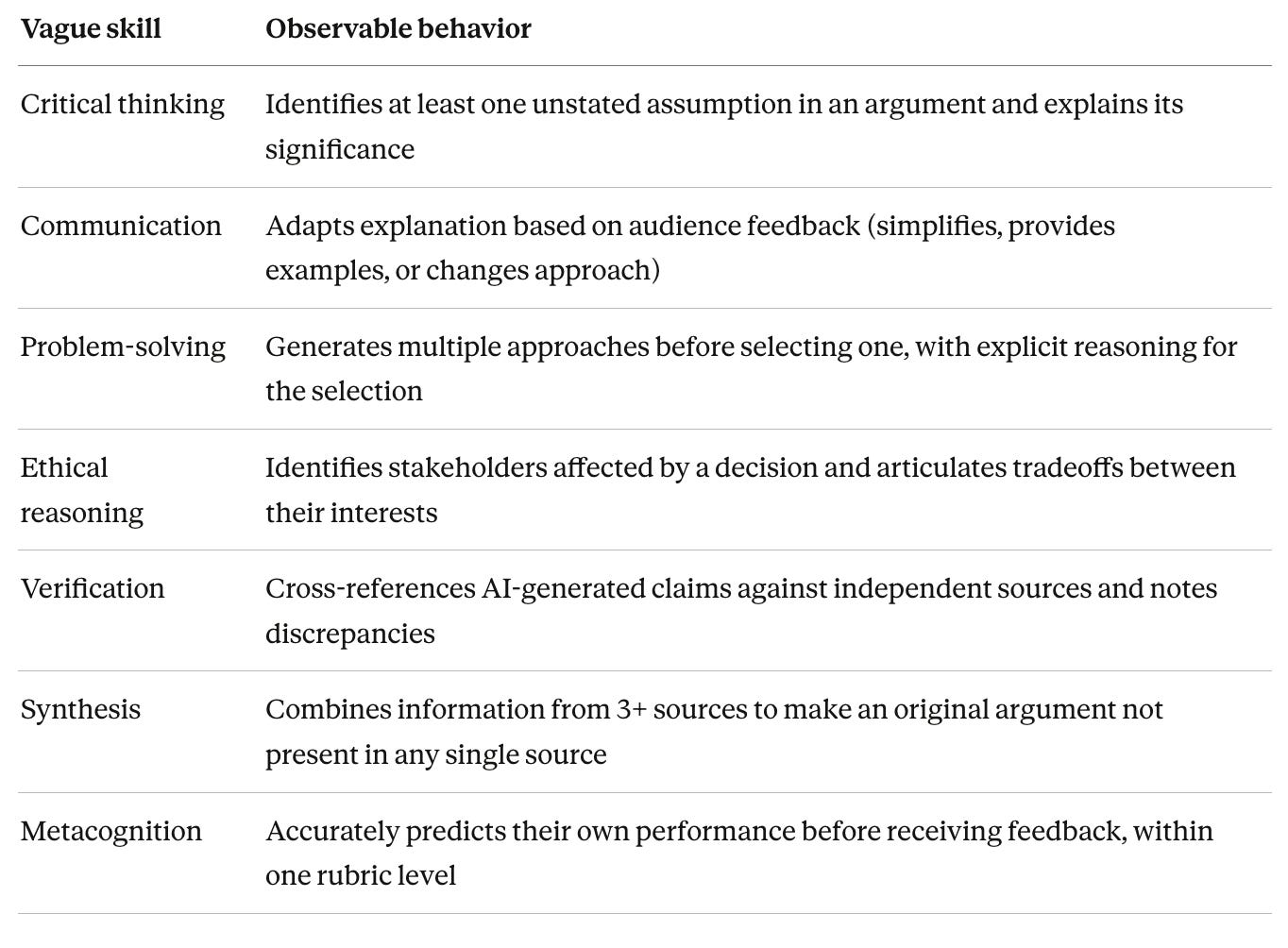
For each skill, complete this sentence: “A student demonstrates this skill when they ___.”
Here are some examples:
Step 3: Prioritize (15 minutes)
You can’t assess everything. Select 5–7 skills for your initial map. Choose skills that:
Align with existing course learning outcomes
Will remain relevant as AI capabilities change
Can be observed in the assignment types you already use
Deliverable
A one-page Human Skills Map with 5–7 skills, each defined as an observable behavior. Post this in your syllabus and reference it throughout the course.
Week 1–2: Build Your AI Roles Menu
What to do
Create a menu of 6–8 AI “roles” students can adopt when using generative AI.
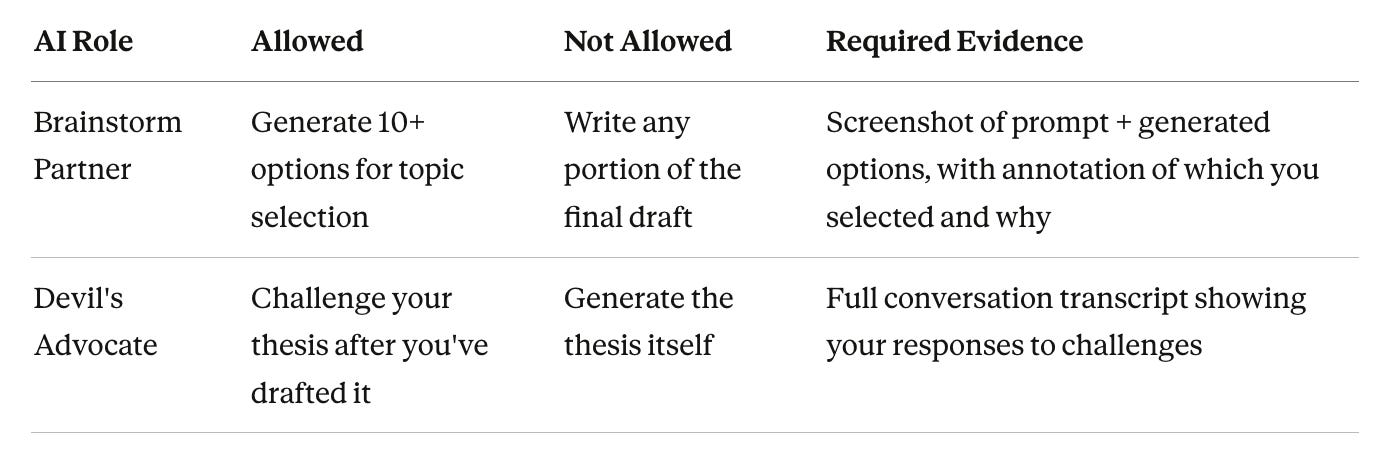
For each role, specify what’s allowed, what’s not allowed, and what evidence students must produce.
Why AI roles matter
Students currently approach AI with one mental model: “get it to write my assignment.”
Roles reframe the interaction.
Instead of “use AI to produce output,” students learn “use AI as a brainstorm partner” or “use AI as a devil’s advocate.”
This shift has two effects:
It makes the human skill explicit. If AI is playing devil’s advocate, the human must defend their position.
It creates variety. Students who use the same role every time are missing skill development opportunities.
How to do it
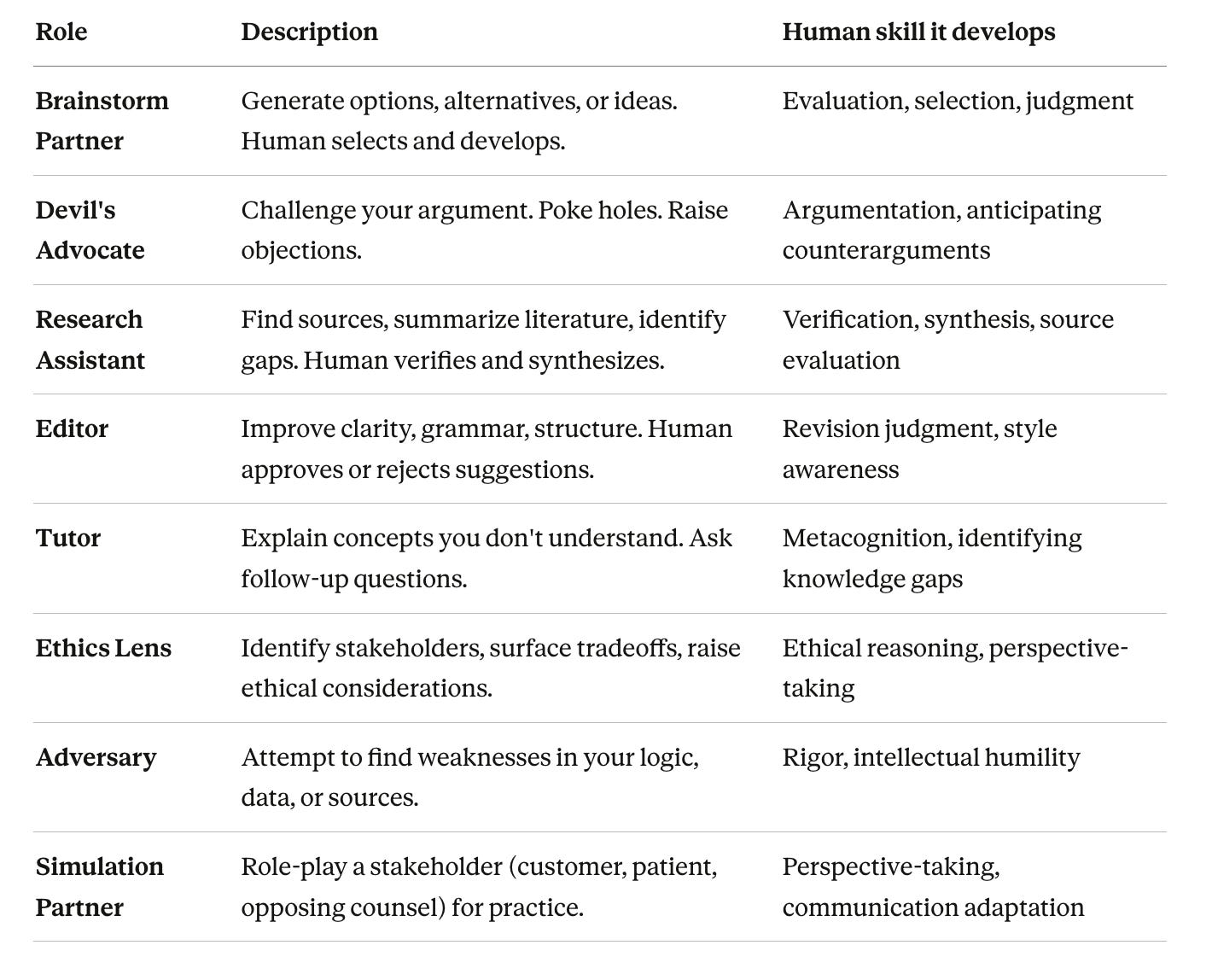
Step 1: Define 6–8 roles
Start with these archetypes and adapt to your discipline:
Step 2: Specify boundaries for each role
For every role, complete a simple table:
Step 3: Map roles to assignments
For each major assignment, specify which 2–3 roles are appropriate and which are prohibited. This prevents the “I used AI as an editor” justification for wholesale generation.
Deliverable
A one-page AI Roles Menu with 6–8 roles, each showing allowed/not allowed/required evidence. Post in your syllabus.
Week 2: Create the Student SHARP-E Loop
What to do
Teach students a simple, repeatable process for any AI-assisted work.
SHARP-E gives them a micro-loop to follow (NOTE - I updated this from my first post):
S – State your goal clearly before prompting
H – Human judgment first (what do you already know?)
A – Ask AI for specific assistance (using a defined role)
R – Review critically (check for errors, bias, hallucinations)
P – Produce your own synthesis (AI output is input, not output)
E – Evidence the process (document what you did)
Why a process loop matters
Students don’t know what “using AI responsibly” looks like in practice. They need procedural knowledge, not just policy compliance.
SHARP-E provides scaffolding they can internalize.
The “H” step is particularly important. Research on AI literacy consistently finds that students over-rely on AI when they skip the step of activating their own prior knowledge first.
The “R” step addresses the well-documented problem of AI hallucinations, that students need explicit instruction in verification techniques.
How to do it
Step 1: Create a one-page SHARP-E handout
Include:
The acronym with brief explanations
One worked example from your discipline
Common mistakes to avoid at each step
Step 2: Model the loop in class
In a 15-minute demonstration:
Show your screen as you complete a task using SHARP-E
Verbalize your thinking at each step
Deliberately show what happens when you skip a step (e.g., what happens when you don’t review critically)
Step 3: Require evidence of SHARP-E in assignments
The loop only becomes habit through practice. Require students to submit a brief “SHARP-E log” with their first AI-assisted assignment showing:
What goal they stated
What they already knew before prompting
Which AI role they used
What they reviewed and changed
How their final product differs from the AI output
Deliverable
A one-page SHARP-E handout for students, with a discipline-specific worked example.
Week 2–3: Set Your Course AI Policy Using AIAS
What to do
Adopt the AI Assessment Scale (AIAS) as your policy framework. The AIAS gives you five levels to tag every assignment:
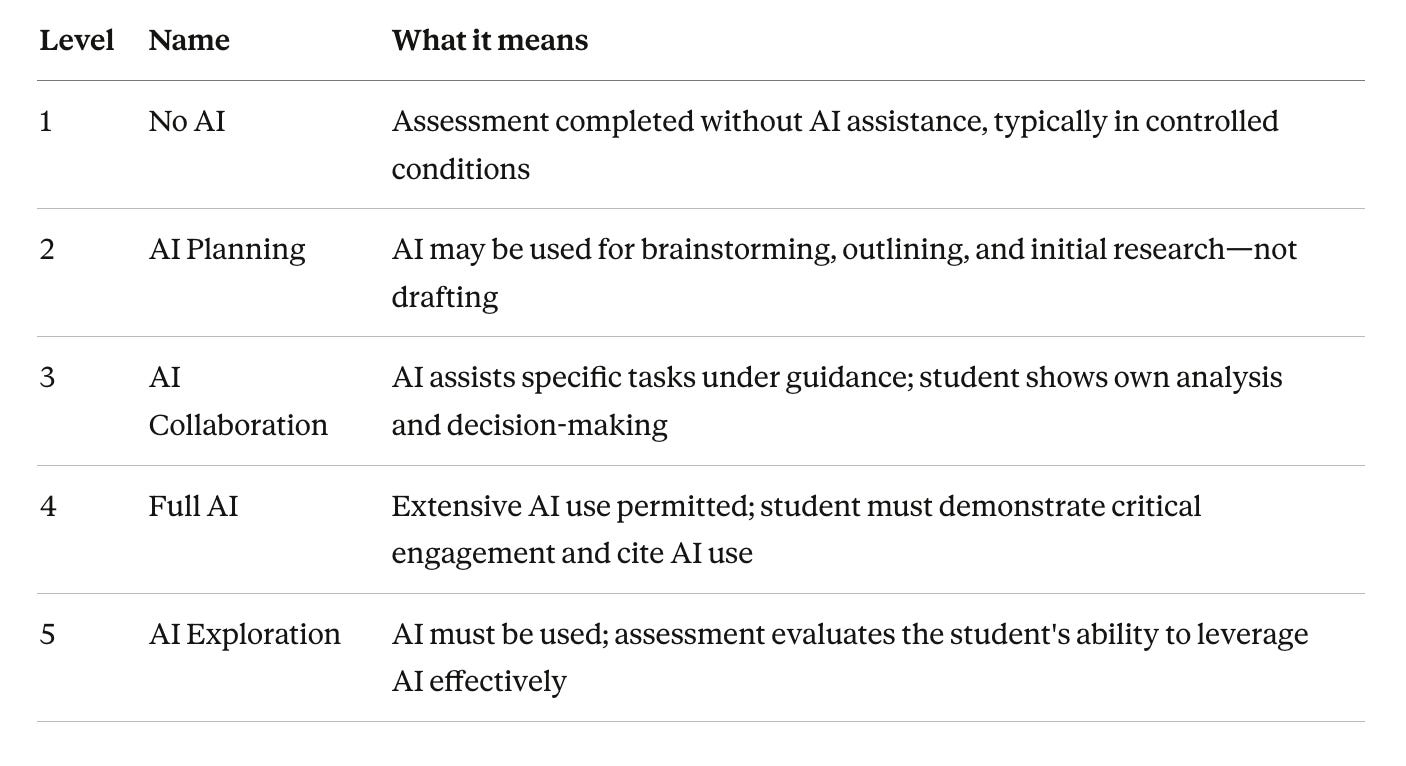
Why AIAS matters
Binary “AI allowed / AI prohibited” policies are unsustainable. They don’t match how professionals use AI, they don’t support skill development, and they create endless edge cases (”Is Grammarly AI?”).
AIAS gives you nuance without complexity.
You can say: “Essay 1 is Level 1 because I need to assess your baseline writing. Essay 2 is Level 3 because I want you to practice using AI as an editor while maintaining your own voice.”
How to do it
Step 1: Audit your current assignments
List every graded assignment in your course. For each, ask:
What learning outcome does this assess?
What human skill must the student demonstrate?
What role could AI appropriately play, or not play?
Step 2: Assign an AIAS level to each
Be intentional. A portfolio course might have:
Early assignments at Level 1 (establishing baseline capability)
Mid-course assignments at Level 3 (practicing AI collaboration)
Late assignments at Level 4 or 5 (demonstrating AI fluency with human oversight)
Step 3: State AIAS levels explicitly in assignment instructions
Every assignment prompt should include:
The AIAS level for this assignment
What that level means for this specific task
What evidence students must provide
Evidence base
The AIAS was developed by Perkins, Furze, Roe, and MacVaugh, first published in the Journal of University Teaching and Learning Practice (2024). It has been adopted by hundreds of institutions worldwide and is noted by the Australian Tertiary Education Quality and Standards Agency (TEQSA) as an option for implementing GenAI into assessment.
The revised AIAS is grounded in social constructivist principles and designed with assessment validity in mind. It is not a recommendation for a “best” level—different assignments warrant different levels based on learning outcomes.
Deliverable
A course assignment matrix showing AIAS level for each graded assignment, with brief rationale. Add AIAS level to syllabus and all assignment prompts.
Week 3: Design Your Disclosure Standard and Template
What to do
Create a required AI disclosure form that students submit with every assignment. The disclosure should be specific enough to verify, simple enough to complete in a few minutes, and consistent across the course.
Why disclosure matters
Disclosure serves three purposes:
Transparency: You know what tools students used and how
Evidence: You have a record for academic integrity purposes
Reflection: Students must articulate their AI use, which builds metacognition
Disclosure only works if you actually require it and make it easy.
A vague “describe your AI use” prompt generates vague responses.
A structured template generates usable data.
How to do it
Step 1: Design a simple template
Include these fields:
AI DISCLOSURE FORM

Assignment: ________________________
AIAS Level for this assignment: [ ]1 [ ]2 [ ]3 [ ]4 [ ]5

1. Which AI tool(s) did you use? (Check all that apply)
   [ ] None  [ ] ChatGPT  [ ] Claude  [ ] Copilot  [ ] Gemini  [ ] Other: _______

2. Which AI role(s) did you use from the course menu?
   [ ] Brainstorm Partner  [ ] Devil's Advocate  [ ] Research Assistant
   [ ] Editor  [ ] Tutor  [ ] Other: _______

3. Briefly describe what you used AI for:
   _________________________________________________________________

4. What did you do differently because of AI's output? (What did you verify, change, reject, or synthesize?)
   _________________________________________________________________

5. Did you follow the SHARP-E process?  [ ] Yes  [ ] Partially  [ ] No

6. I certify that this disclosure is accurate: [ ] Yes

Attached: [ ] Relevant prompt/response screenshots (if required for this assignment)
Step 2: Make it a required submission component
The disclosure should be a mandatory file upload alongside the assignment itself. Non-submission = incomplete assignment.
Step 3: Actually read them
Spot-check disclosures regularly. Students quickly learn whether you pay attention. Reading even 20-30% deeply sends a signal that disclosure matters.
Evidence base
UNESCO’s Guidance for Generative AI in Education and Research (2023) explicitly emphasizes transparency and data privacy. The guidance recommends that institutions develop clear protocols for students to document AI use. Research on academic integrity suggests that disclosure requirements, combined with clear expectations, reduce unintentional policy violations.
Deliverable
A one-page disclosure template. Add submission requirement to your LMS assignment setup.
Week 3–4: Build Your First Integrated Rubric
What to do
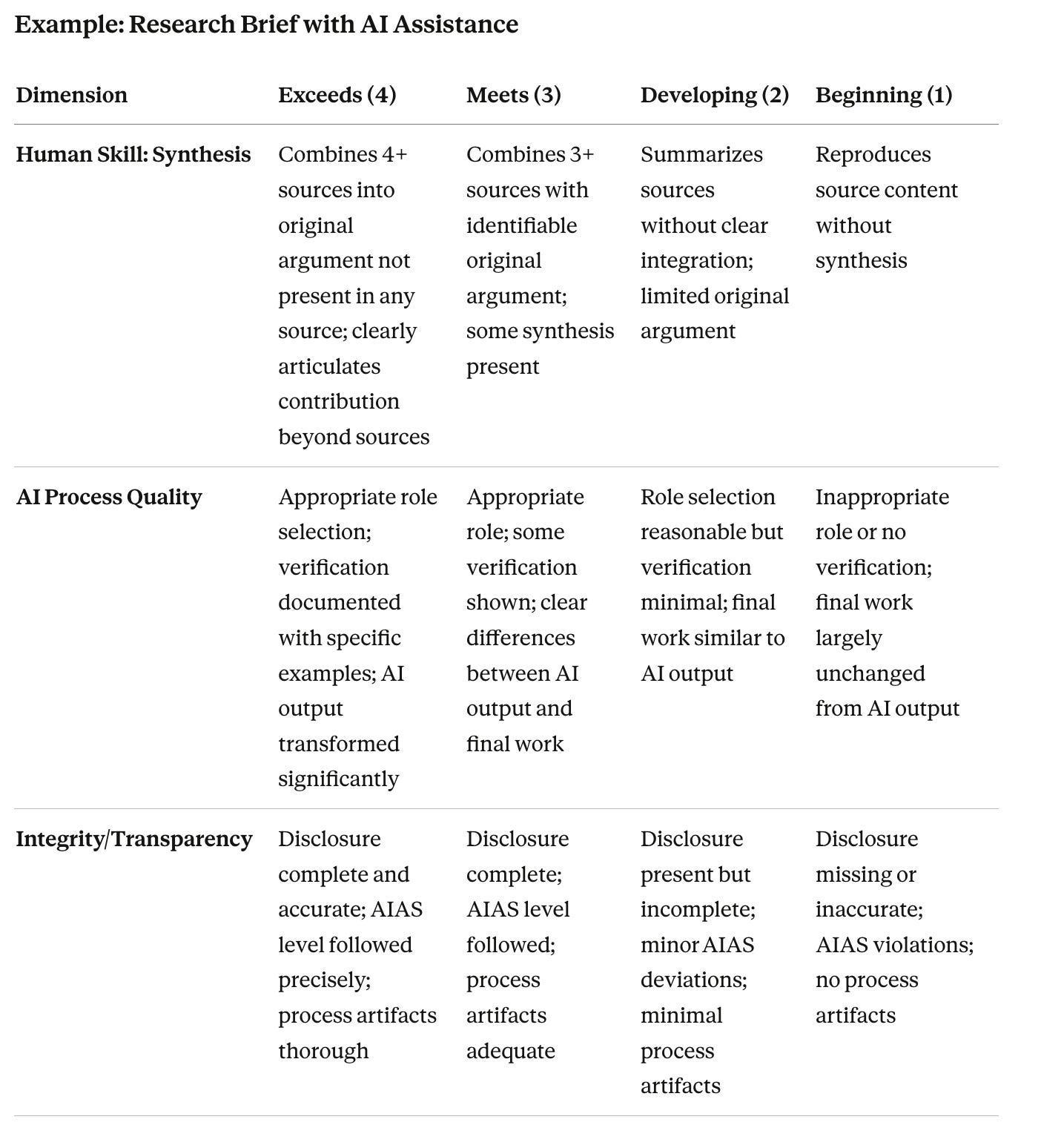
Create a rubric for one assignment that separates three distinct scores:
Human skill performance (the observable behavior you’re developing)
AI process quality (appropriate role choice, verification, critical engagement)
Integrity and transparency (accurate disclosure, data care, AIAS compliance)
Why three scores matter
Traditional rubrics collapse everything into “quality of work.” This rewards students who use AI most effectively to produce output, regardless of what they learned.
Separating scores makes each dimension visible and valued.
A student can score well on AI process quality (they used the right roles and verified carefully) but poorly on human skill performance (their live explanation was weak).
This gives you diagnostic information and gives students clear feedback on what to improve.
How to do it
Step 1: Identify one assignment to pilot
Choose an assignment where:
A human skill can be directly observed (oral component, live work, or process artifacts)
AI assistance is appropriate at some level (AIAS 2–4)
You have enough time to grade three dimensions
Step 2: Design rubric dimensions
For each of the three areas, create 3–4 performance levels. Be specific and use observable indicators.
Step 3: Weight the dimensions intentionally
If human skill development is your primary goal, weight it highest. A reasonable starting distribution:
AI process quality: 30%
Integrity/transparency: 20%
Human skill performance: 50%
Adjust based on assignment goals. An early-course assignment might weight integrity/transparency higher (establishing norms). A late-course assignment might weight human skill performance almost entirely.
Deliverable
One rubric with three scored dimensions for a pilot assignment. Test it on one assignment before expanding.
Week 4: Run the AI Literacy Minimum Session
What to do
Run a 30–45 minute “AI Literacy Minimum” session in class.
This isn’t optional.
Students need baseline knowledge before they can use AI effectively or follow your policies meaningfully.
Why this session matters
Most students have used ChatGPT. Very few understand:
What verification actually requires
Why process documentation matters
How LLMs actually work (probability over truth)
Why hallucinations happen (and that they will happen)
This session fills critical knowledge gaps and establishes shared vocabulary for the semester.
How to do it
Part 1: How GenAI Works (10 minutes)
Cover at the minimum:
Plausible-sounding output ≠ accurate output
Different models have different capabilities and limitations
Training data includes errors, biases, and outdated information
LLMs predict next tokens based on patterns—they don’t “know” facts
Part 2: The Hallucination Problem (10 minutes)
Live demonstration:
Ask students to identify what makes it convincing
Show the verification process (how would you check this?)
Show an AI generating confident, specific, false information
Discuss why hallucinations are particularly dangerous in your discipline
Part 3: Verification Techniques (10 minutes)
Teach specific techniques:?
Domain expertise: What do you already know that contradicts this output?
Lateral reading: Open new tabs to check claims against independent sources
Source tracing: If AI cites a source, find the original—does it say what AI claims
Consistency checking: Ask the same question multiple ways; flag inconsistent answers
Part 4: Your Course Framework (10 minutes)
Walk through:
Your Human Skills Map (what we’re developing)
Your AI Roles Menu (how you’ll use AI in this course)
The SHARP-E process (your procedure for every AI interaction)
Your AIAS levels (what’s expected for each assignment)
Your disclosure requirements (what you must document)
Deliverable
A 30–45 minute AI Literacy Minimum session, run during Week 4 before any AI-assisted assignments are due. Keep slides simple, this is about shared understanding, not comprehensive training.
Week 4: Set Data and Privacy Norms
What to do
Establish clear rules about what students can and cannot input into AI systems. This is an integrity issue and a privacy issue.
Why privacy norms matter
When students paste assignment prompts, peer work, or confidential case studies into ChatGPT, that content may be used to train future models. This creates risks for:
Academic integrity (assignment prompts leak)
Peer privacy (student work shared without consent)
Institutional liability (proprietary or FERPA-protected information exposed)
You must set norms, not just hope students figure it out.
How to do it
Step 1: Define what’s off-limits
At minimum, establish these rules:
Never input other students’ work without explicit consent
Never input anything you wouldn’t want publicly accessible
Never input assignment prompts you don’t have permission to share
Never input confidential case information, patient data, or proprietary content
Step 2: Recommend data-conscious practices
Consider what’s necessary for the prompt—don’t overshare
Be aware that “deleting” a conversation doesn’t remove it from training data (in most tools)
Use tools with privacy protections when available (e.g., ChatGPT’s “don’t train on my data” setting)
Step 3: Add privacy to your disclosure form
Include a checkbox:
[ ] I confirm that I did not input any confidential, proprietary, or third-party information into AI tools without appropriate consent.
Deliverable
A brief privacy norms section in your syllabus. An additional checkbox on your disclosure form. A brief mention during your AI Literacy Minimum session.
Phase 0 Milestone Checklist
By the end of Week 4, you should have:
Human Skills Map (5–7 skills defined as observable behaviors)
AI Roles Menu (6–8 roles with allowed/not allowed/evidence requirements)
Student SHARP-E one-pager (with discipline-specific example)
Course AI policy using AIAS (level assigned to each assignment)
Disclosure template (required submission component)
One integrated rubric (three scored dimensions)
AI Literacy Minimum session (delivered in Week 4)
Data and privacy norms (documented in syllabus)
These eight deliverables constitute the minimum viable system.
They’re enough to run HUMAN Skills Studio in one course.
You will iterate. The first version will have gaps. Students will find edge cases you didn’t anticipate. The rubric will need adjustment after you try grading with it. That’s fine. The purpose of Phase 0 is to have something to iterate on.
The Workload Reality Check
If Phase 0 feels like too much, you’re right to be cautious.
Here’s the honest accounting:
Front-loaded time investment: Expect 8–12 hours across Weeks 1–4 to create the deliverables and prepare the literacy session. This is significant, but it’s not recurring.
Ongoing time commitment: Reading disclosures and grading with a three-dimension rubric adds ~5–10 minutes per assignment initially. This decreases as you develop fluency.
What you get back: Process documentation makes academic integrity cases clearer. Separated rubric scores give you diagnostic information you couldn’t get before. The SHARP-E loop reduces the number of “I didn’t know how to use AI” conversations.
If 8–12 hours is impossible this semester, consider:
Start with just the AIAS levels and disclosure form (2–3 hours)
Add the rubric for one assignment only (1–2 hours)
Run a shortened AI Literacy Minimum (20 minutes instead of 45)
Delay the full AI Roles Menu until Phase 1
Any infrastructure is better than no infrastructure. Build what you can sustain.
What Comes Next
Phase 0 gives you the foundation. In Phase 1 (Months 2–4), you’ll pilot the system inside your course with two “skill labs” and one redesigned assignment. The goal shifts from building infrastructure to proving the loop works.
But that’s for later. Right now, focus on getting the minimum viable system in place. Imperfect and running beats perfect and imaginary.